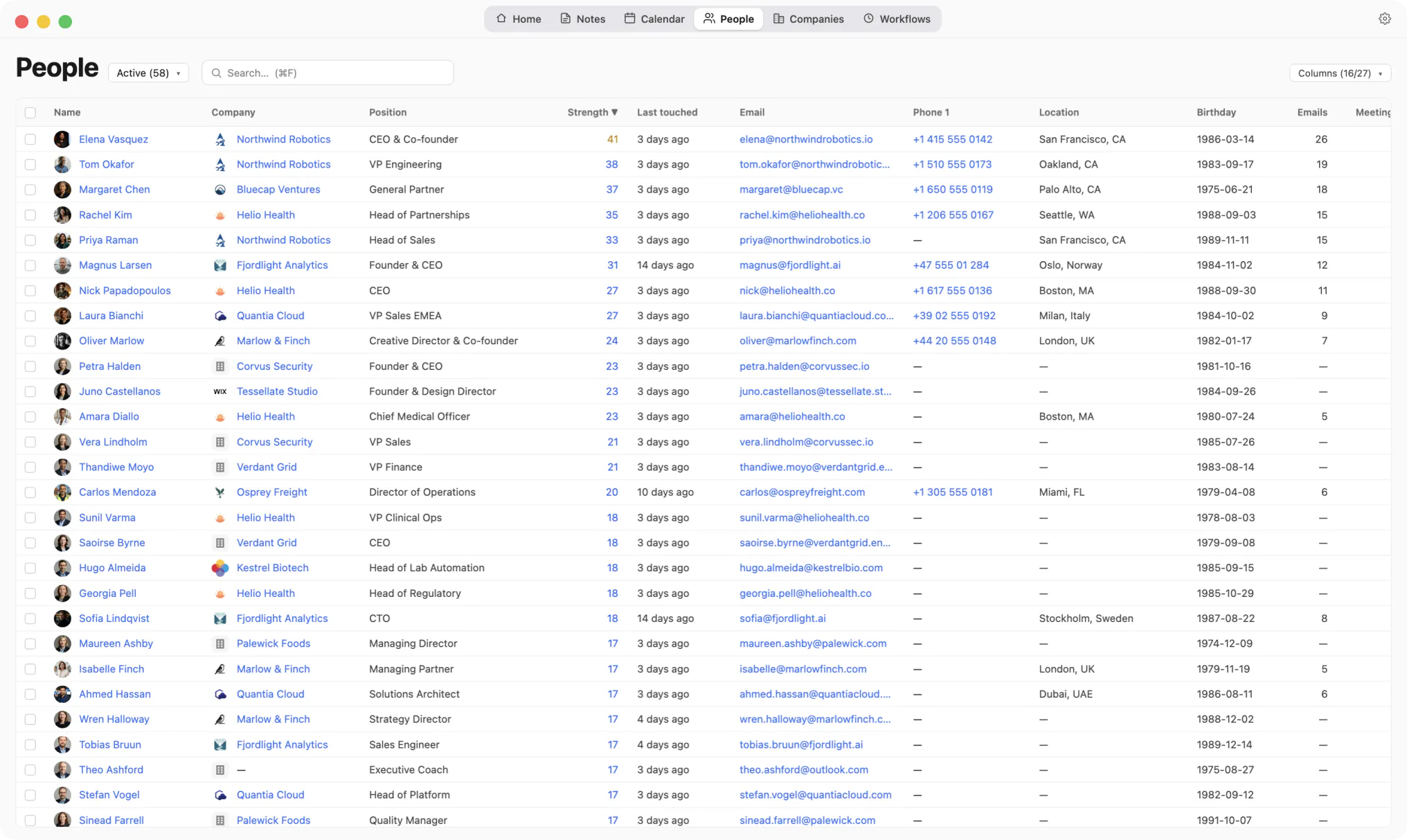
One row per person, a handful of columns, and a date that updates itself. You choose which columns to show.
Keep one record for each person. Use the same few fields for everyone. Archive instead of deleting, and sort by the date you last spoke.
One row per person, a handful of columns, and a date that updates itself. You choose which columns to show.
Ask an AI about organising contacts
These open a chat with the question already typed, pointed at this page. It asks for a balanced answer, including where Kola is the wrong choice.


Keep one record per person, and let that record fill itself from the accounts you already use. Add only what would change what you do next.
Most contact lists fail for the same reason. Every new person adds work you have to do by hand. Six rules keep that work small.
| The rule | What it does |
|---|---|
| One record per person | Keeps the history in one place. Two records for one person means half the story on each. |
| The same few fields for everyone | Makes the list sortable. A field filled in for three people will not order the rest. |
| One line after a conversation | Holds what no field holds. What they are working on, and what they asked you for. |
| Lists named after your work | Gives you a list you open. "Hiring, backend" is work. "Engineers" is a category. |
| Archive, never delete | Keeps the quiet people findable. Deleting takes the history with it. |
| Sort by when you last spoke | Shows a relationship going quiet. It is the one column that changes on its own. |
Because they are filled in by hand, and the work grows with every person you meet. Fifty names are easy to keep current. Four hundred is a job you keep putting off.
The decay is slow and quiet. Someone changes job and their work email stops working. A title from three years ago is now out of date. One person turns into three records, one from your phone, one from a conference badge, one from an email thread.
It also helps to be clear about what each tool is for. An address book is for reaching someone whose name you already know. A spreadsheet is for a snapshot you take on one day. Keeping either one current is work you do yourself.
The question worth answering is who has gone quiet. To see that, you need one thing above all. A last-contact date you did not have to type.
Far fewer than you can store. Robin Dunbar's well-known estimate is about 150 stable relationships, and that figure is disputed.
In 1993 Dunbar estimated the number from a proposed link between brain size and group size in primates. Patrik Lindenfors, Andreas Wartel and Johan Lind reworked the same method in 2021. They argue the estimate is unreliable, and that no single number can be given.
The disagreement does not change what you should do. Under every estimate, your contact list is larger than the number of relationships you can maintain. So the job is ranking, not storing.
Ranking is not pruning. Mark Granovetter showed in 1973 that new information usually arrives through people you are not close to. A contact you have not spoken to in two years can still bring you something your close circle does not have.
So keep everyone, and rank them. That is what "archive, never delete" is for.
Keep what changes what you would do next. Six fields cover most of it, and one line written after a conversation is worth more than any of them.
The test is simple. If you would never search for it, sort by it, or read it before a call, it is not worth typing.
| What to keep | Worth keeping | Not worth typing |
|---|---|---|
| Who they are | Name, company, role | A job title you cannot check |
| How to reach them | One email, one number | Every address they have ever had |
| Where they are | City, for the time zone | A postal address you will not post to |
| How you met | One sentence, written once | Nothing, and then guessing later |
| What they care about | A line after each conversation | A star rating you set once |
| When you last spoke | A date filled in for you | A date you promise to update |
The last row decides whether the list stays useful. A date you keep by hand falls out of date quickly, and a stale date is worse than none, because you act on it.
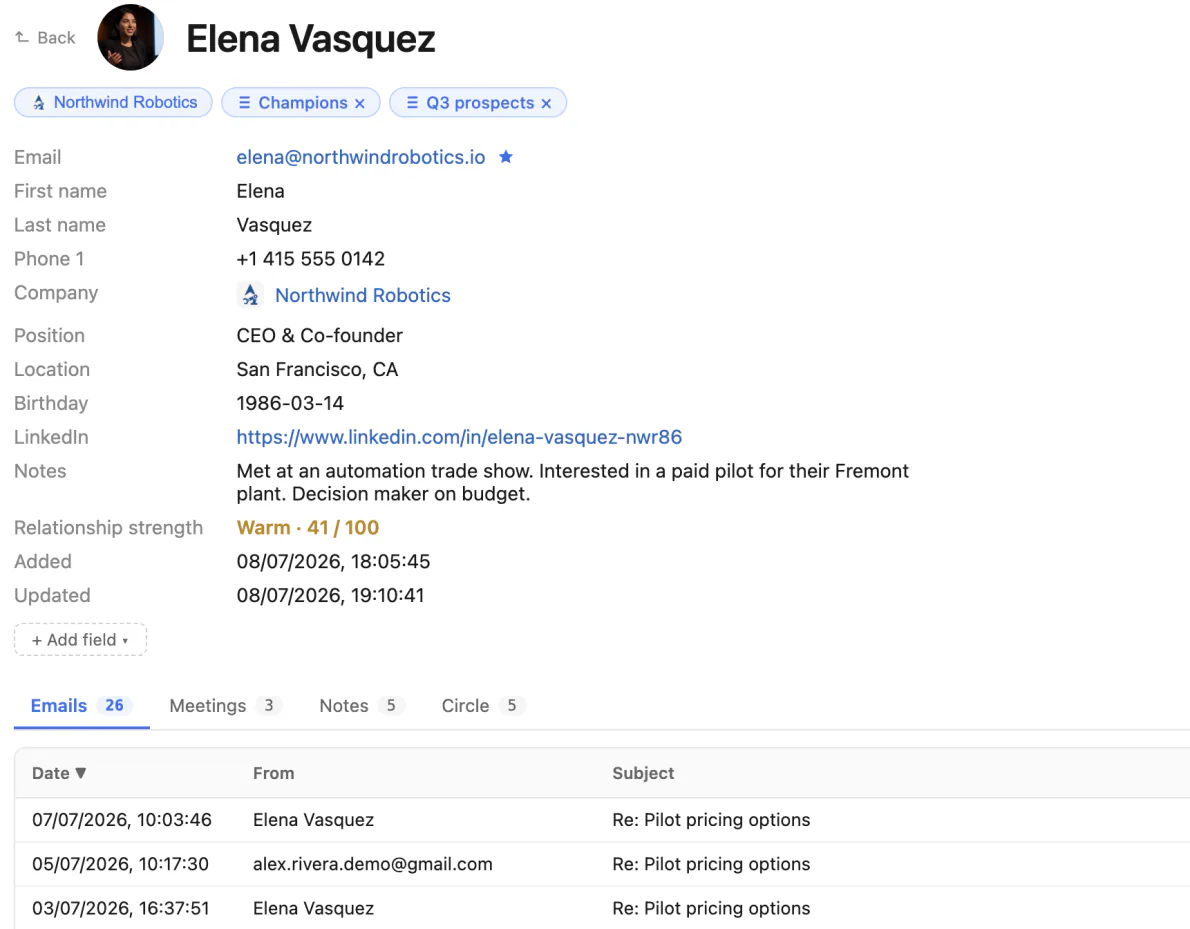
One person, the fields worth keeping, and the note that holds what no field holds.
Use a small number of lists, named after work you are doing rather than kinds of people. "Hiring, backend" is a list you open. "Engineers" is a category you never open again.
Folders ask you to pick one home per person, and people do not have one home. Your former colleague is also a candidate, and may become a customer. Lists let the same person sit in three at once.
Then add a column only when you would sort by it. A renewal date and an "introduced by" field earn their place, because you can put the list in order with them. A free-text field called "notes about their team" cannot sort anything.
If you cannot say what you would do with a list this month, do not make it yet. Five or six lists is a working set. Twenty becomes a filing system of its own.
Match people on something that travels with them, not on how their name is spelled. An email address, a phone number, a LinkedIn address.
Names are the worst possible key. The same person is Bob and Robert, writes from two addresses, and appears with an accent in one export and without it in another.
Kola matches in a fixed order and stops at the first hit. Here is that order, from the most reliable signal to the least.
| Order | What is compared | Why it sits here |
|---|---|---|
| 1 | Telegram account | An account id, not a name |
| 2 | WhatsApp account | The account id, not the display name |
| 3 | LinkedIn profile | A link to their profile page |
| 4 | Email address | Any of their addresses, not just the first |
| 5 | Phone number and name together | Last, and only for an address book import |
The last rung shows why the order matters. Numbers are shared in real life, by a family, a couple, or a company switchboard. So a number alone is never enough, and the names have to agree as well.
When two records do slip through, merging them keeps both sides. The spellings are kept so search still finds the old one.
Kola builds the list from the accounts you already use, then keeps it current on its own. Everything stays in one file on your Mac.
Start with the records. Connect Gmail, a calendar, Telegram, WhatsApp, Slack, LinkedIn or your address book, and the people come from there. Each one arrives through the ladder above, so the same person from four accounts is one record.
Companies appear on their own. A new work email domain becomes a company, and the people at it are grouped under it without you typing a company name twice.
Then choose your columns. For each list, Kola remembers which columns you show, the order they sit in, and how you sort them. Sorting the Investors list by renewal date does not disturb how you look at everybody else.
Add your own columns when you need them. A custom field can be text, a number, a checkbox, a date and time, a company or a file, and it becomes a column you can sort and filter like any other.
Kola also ranks people for you. Strength is a number from 0 to 100, and Kola works it out for every person. It counts the days you actually talked, across every account you connected, and it fades over years rather than months, so someone you have known a long time stays close through a quiet spell. Beside it Kola says whether you are overdue, measured against how often the two of you usually talk. A friend you speak to twice a year is not late in March.
Search covers the rest. Type part of a name, filter on any column, or search by meaning: "who complained about onboarding" finds the message that said "the setup took us three weeks".
Yes. Kola's Contact merge agent groups the records that look like one person, and merges a group on its own only when the answer comes back at medium or high confidence. You can also set it to suggest every merge and change nothing itself.
It works in groups, not pairs. Every record that might be the same person goes into one group, whether the hint was a shared email address, a similar name, a phone number or the wording of their profile. Kola asks about the whole group once, instead of once for every possible pair.
One rule overrules the model. If two records carry different values of the same identifier, two different Telegram accounts or two different LinkedIn profiles, they are two people and the merge is blocked. Two people with the same name in one group chat stay two people, whatever the model concluded.
A missing account conflicts with nothing. A record known only by email and a record known only by LinkedIn still merge, which is the common case.
A merge is not cleanly reversible, which is why the bar is higher here than anywhere else in Kola. Which record survives is part of the same judgement, and the fullest record is the fallback. You can still split a wrong merge back apart.
For that judgement Kola sends the model contact details, not your correspondence. Each member's name, email addresses, phone number, company, role, location and linked account ids, plus how much you were in touch. No message, email or note body is sent.
Yes, from information already in Kola. A field that has a value is never overwritten, and an empty one is filled automatically only when the answer is high confidence.
Kola's Contact enrich agent fills name, company, role, location, phone, LinkedIn and birthday. It starts with the people you are closest to and works down.
There is no web search. The evidence is what already sits in your own data: a Telegram bio, a note you wrote, the signature at the foot of their first email, their first direct message on each channel, the titles of meetings you shared, and the company that other people on the same email domain already carry. Message evidence is a few short lines of the contact's own words, never a whole thread and never your side of it.
Names are held to a higher bar again. A name is filled in only when it comes from something the contact wrote themselves, such as the sender name on their own email. A name taken from a meeting title waits for you instead.
Everything else lands on the run page as a suggestion, with the old value beside the new one. You apply it, dismiss it, or put back one that was already applied.
| The agent | What it does on its own | What waits for you |
|---|---|---|
| Contact merge | Merges a group when the answer is medium or high confidence | Low confidence, and any pair whose accounts conflict |
| Contact enrich | Fills an empty field when the answer is high confidence | Everything else, and every name it cannot ground |
| Both | Nothing until you switch them on | Set either one to suggest only, and it changes nothing by itself |
Twice a year is enough, because the two agents above do the finding. You are left with the decisions they would not make alone.
Both are off until you turn them on, in the setup steps or on the agent's own card. Both send data to the AI model you choose, and the Security page names contact enrichment as one of the three features that do. You pick the model and set a limit in dollars a month, and neither one can spend past it.
A third agent handles the addresses that are not people at all. Notifications, receipts and no-reply senders get an archive suggestion rather than a place in your contacts.
A wrong answer is not final. Every change is recorded with the value before it, who made it and why, so a field can be put back the way it was.
That is the whole maintenance budget. A short session twice a year, on the decisions that need you.
Three papers, all published and all linked. Nothing on this page is measured by us.
How many lists should I have?
Five or six. If you cannot say what you would do with a list this month, you do not need it yet. Lists are cheap to add later and expensive to maintain in bulk.
Should I delete contacts I no longer speak to?
No. Archive them. A quiet contact can still bring you something your close circle does not have, and a deleted record takes the history with it.
Does Kola merge duplicate contacts without asking?
Only when it is confident, and never when the two records carry conflicting accounts, such as two different LinkedIn profiles. You can also set it to suggest every merge and change nothing on its own.
What should I sort my contacts by?
The date you last spoke. It is the only column that changes on its own and the only one that shows you a relationship going quiet.
Is a spreadsheet good enough for professional contacts?
It is fine for a snapshot of a few dozen people you are working with now. The cost is that every row is written and refreshed by hand, and that work grows with every person you meet.
Where does Kola keep my contacts?
In one file on your Mac, under Application Support. Three features you switch on yourself do send data out, and the Security page names each one.
Install Kola and connect an account. Kola builds your contacts from there.