Alternatives

Coming from Mesh?

The same job, done on your own machine.

Download See them side by side

Choose Mesh if

  • You want your network surfaced for you
  • You are happy with a hosted product
  • You work across devices

Choose Kola if

  • You want the index on your own machine
  • You want calls and notes in it too
  • You want to ask ChatGPT or Claude about it
What Mesh is for

Your network, kept on your Mac.

Mesh is a relationship tool. It reads the places you already talk to people and surfaces who you know.

Kola is built for that job too. The difference worth knowing is where your network is held.

What Mesh Kola
Made for Surfacing the network you already have The same job
Reads The accounts you connect The accounts you connect, plus the calls you record
You end up with Who you know, and who they know The same, plus the meeting or note behind each line
Who it suits People who trade on their network People who want that on their own machine

The index is on your Mac

Your people, messages and notes are kept in one file on your Mac. We run no server that receives them, and the features that do send data out are named on the security page.

You choose each source

Every account is connected on its own and can be disconnected on its own. Kola reads nothing you have not handed it.

It answers where you already work

Ask inside Kola, or connect ChatGPT or Claude and ask there. Those send your question and the records needed to answer it to the provider.
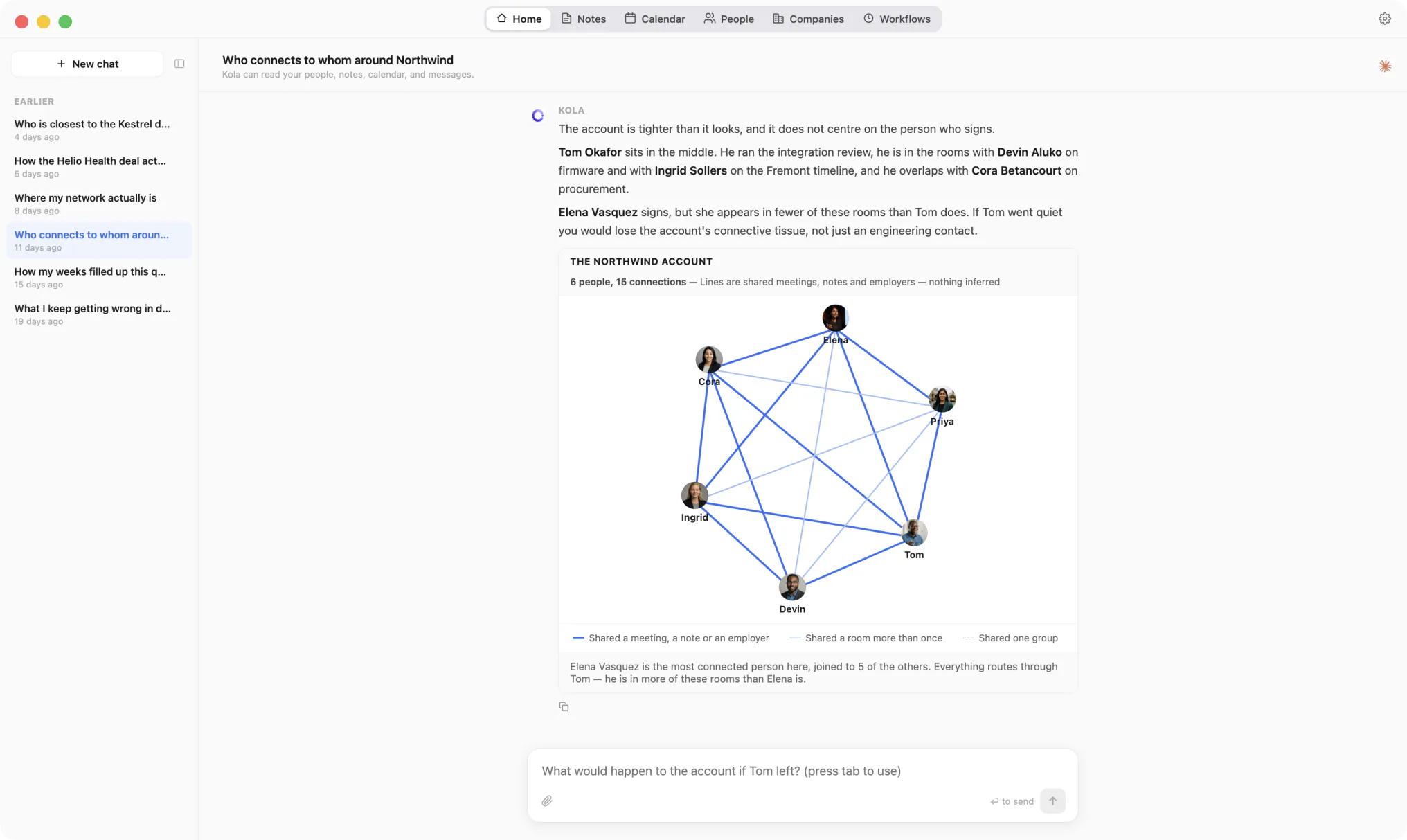
A Kola chat answering who connects to whom around an account, with a six-person network graph and a legend explaining every kind of line

Every line is a shared meeting, note or employer.

Switching

There is nothing to migrate.

Kola does not import from another tool, and it does not need to. It reads the same accounts you already connected elsewhere and builds its own picture from them.

  1. 1

    Install Kola.

    One download, signed and notarized by Apple. Nothing to export from Mesh first.

  2. 2

    Connect an account.

    Start with the mailbox and calendar you live in. Kola reads them in the background and fills itself in.

  3. 3

    Keep both for a while.

    Nothing forces a decision. Run them side by side and keep whichever earns its place.

Questions

Before you switch.

Where does Kola keep my network?

In one file on your Mac. We run no server that receives it. The features that do send data out are named on the security page.

Can I use it from ChatGPT or Claude?

Yes. Kola answers them from your Mac. Those services receive the question and the records needed to answer it.

Do I have to import anything to get started?

No. Connect the same accounts you already use and Kola builds itself from them. There is nothing to export from anywhere else first.

Which accounts can it read?

Gmail, Outlook and Apple Mail, Google and Outlook calendars, Google and Apple Contacts, Telegram, WhatsApp, Slack, LinkedIn, Instagram and Facebook. Connect only the ones you use.

What does it need to run?

An Apple Silicon Mac. Kola is signed and notarized by Apple, so it opens with a normal double-click.

Ask an AI to compare them

These open a chat with the question already typed, pointed at this page. It asks for a balanced answer, including where Kola is the wrong choice.

Get started

Never forget who you know.

Install Kola and connect an account. Kola builds your contacts from there.